


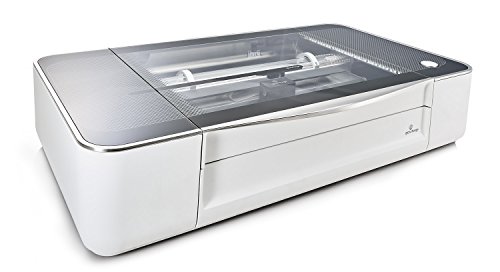
Details: The Glowforge was packaged and shipped with high attention to detail and safety - but easy to unpack, even with it's large size - and surprisingly it came with a huge box of various sample materials! Following the simple directions online, I was set up and printing/cutting within an hour from delivery! Set up of the hardware and the software was REALLY easy. Since all the print/cut prep is done on the software and the device itself only has one button!
The only setup challenge for some buyers will be the venting - make sure you can put this near a window or external vent. I'm lucky to have a window nearby and I use the INCLUDED dryer-vent-style hose to vent the exhaust through a window rig. Glowforge is apparently creating a filter system - but that's not available yet - so venting for now is a must. If you don't have a way to vent the exhaust from cutting, don't buy any laser cutter. The exhaust fan in the Glowforge is powerful, and it does a great job of pushing the cutting exhaust through the vent.
I'm an active #Maker - as a hobby - and have previously focused on 3DPrinting and tried to help make that easier for others by blogging about my journey at MkrClub.com. When I wanted to add Laser-cutting/printing to my tools, I decided I wanted something easy to use, not too demanding from a "wood-shop infrastructure" perspective, and not ridiculously expensive. While the Glowforge was not cheap, it met all my other criteria and was clearly angled to the "Easy enough for anyone" category. That promise has been the most positive aspect of the product.
Through a software/app interface which I can get to on the web - on a chromebook or any other device - I am able to access all my designs, interact with the printer, even see the print/cut bed through the built-in camera. It is incredibly easy to align a design - even resize, move and rotate it - so that it prints on the material that is in the printer at the time through that interface. This really helps to maximize usage of the material you have (by using the un-used sections of partially used material). To get a design into the Glowforge app, I can upload it (SVG format is what I use) or even put a printed or even hand-drawn version of the design in the printer, scan it, and then print/cut it on the wood/acrylic/whatever material! It's truly magical to let my daughter draw something - scan it in the printer - and then cut that design onto the material!
One of my first custom-designs was a tiny jigsaw puzzle. I used a simple drawing product on the ipad (vectornator) and exported the SVG. pulled that into the Glowforge app, and in 1 minute, 48 seconds, the puzzle was done - on draftboard (chipboard-like wood from Glowforge sample pack). It came out AMAZING! I also printed one of their sample boxes which had intricate connectors that worked incredibly well. Their library of designs is definitely another great resource. The Community of other customers is incredibly useful too! I've been constantly getting answers there for practically every topic - including cutting non-standard materials, venting ideas, design apps, etc.
This was a tough purchase decision - and I feel the Glowforge has met my high expectations in every way! I've included images (and one quick video) of some early projects I made - puzzle, custom-designed box (to store the puzzle) and the pre-deisgned box from the Glowforge library...
The 30,000 ft view in this review is: Glowforge is *amazing*. If you’re into making things and you’re on the fence about getting one, just do it. It’s positively incredible. I have the “Plus” model, which I definitely recommend. I like the extra power of the Plus laser, and I don’t feel like the slot is worth the extra $2k upgrade cost for the Pro. (Some folks who use the Glowforge for cutting/engraving large signs DO think the slot is worth the extra though!)
I own a 3D printer, and a workshop full of woodworking tools. I bought the Glowforge as a “cherry on top” accessory for my woodworking, thinking I’d use it to engrave various wood parts when working on furniture. But I’ve wound up using it for far more than just that.
Before buying the Glowforge, I spent a lot of time and money on alternatives that I thought could be used to for the same purposes. For example:
Wood burner - Takes too much skill and time for what I wanted to use it for. If you’re into wood burning for the sake of cultivating the skill, then go for it, but for me, this is just a means to an end, and I wanted the fastest way to that end.
3D Printer - Great for what it does, but it is: 1. Very slow; 2. Only outputs plastic; 3. Can’t be used with “real” materials like wood, plexiglass, leather, etc.;
Scroll Saw - Great tool, and I still use it, but it doesn’t do engraving, and doesn’t work well with Plexiglass or Leather, really only wood.
In the end, nothing beats the precision and versatility of the Glowforge. I have used it to cut and engrave wood. To cut and engrave Plexiglass (!!! This is amazing on the Glowforge!) Cut and engrave leather. And so on. I’ve developed a whole system for cutting dungeon tiles for D&D on the Glowforge. I’ve engraved several wood projects. I’ve cut plexiglass with it. I’ve done leatherworking on it. It’s amazing.
I want to call out specifically plexiglass work here. The Glowforge makes engraving and cutting plexiglass so easy, you’ll wind up spending time just looking for plexiglass projects so you can use it. Particularly the edge that the Glowforge makes in the plexiglass is so smooth and so clear, you can shine a light up through the edge and have your engraving lit up! It’s very cool.
When it comes to leather, I’ve made leather Apple Watch bands, and covers for notebooks on it. It even cuts the holes for sewing the leather, which makes it super easy.
The pros of the Glowforge are:
Works with real materials. Wood, leather, plexiglass, even anodized aluminum (engraving). It’s also quite fast. SUPER easy to design for... all you need is a good vector drawing program. I use Adobe Illustrator, but a lot of folks use the free app Inkscape.
The cons are:
Only works on flat things (.5” thick to cut, and IIRC 2” thick for engraving). Is a bit loud. Can’t cut certain materials that have chemicals in them that are toxic when burned.
Here’s some examples of my work.
I ordered the Glowforge Plus a month ago from Amazon, and it arrived a couple of days later. Prime saved the typical $150 shipping charge, and using the Amazon credit card garnered another 5% cash back. The unit arrived with the packaging a bit undone, but there was no damage to the machine which was well packed.
I followed the setup instructions, but did not get the glowing button by default, which prompted me to write an email to Glowforge support. I received a reply 4 hours later, which pleased me. Their reply directed me to hold the Glowforge button down for 15 seconds which would cause it to glow and be in the mode to look for the wifi in setup. With this tip I was able to complete the connection to my home wifi.
I have installed and learned to use Inkscape to prepare the SVG files for the Glowforge. I am impressed with Inkscape and it is free to use. I saw a couple of tips on the Glowforge community forum, which I have followed to improve Inkscape. The first tip was to install a default Glowforge color palette where the colors are in the sequence that Glowforge will use in engraving, scoring and cutting the parts of a project. Thus, in design mode, I can pick the stroke and fill colors for the sequence that I want Glowforge to follow. Any cutting is placed as my last step. I know that the steps can be rearranged in the Glowforge software, but it is nice to have the project pre-sequenced when loaded.
Another forum tip was to install a Box maker Extension in Inkscape, which I downloaded, installed, and have used to make boxes out of the proofgrade draft board or white hardboard. The extension makes it very easy to design boxes with dovetail joints on the corners. My most recent project used the Box extension to design and cut specimen cases for an upcoming rock show. Each case is 10x18x1 inches with an interior grid every 2 inches so that the case has 45 cells for displaying small rocks and fossils.
My favorite materials to use are 1) Medium draftboard (proofgrade) 2) Medium clear acrylic (proofgrade) and 3) 1/8th inch white hardboard from Home Depot. The white hardboard has a shiny white surface and dark interior, which makes for excellent contrast when engraved. This white hardboard is also cheap at $11 for a 4 ft. x 8 ft. sheet. I had Home Depot cut the sheet in the store into 19 inch by 4 foot strips. I then cut these 19 inch strips on my table saw into 12 inch widths so I have 19x12 inch boards to put in the Glowforge. The smoke accumulation on the white surface easily wipes off with a damp paper towel. Or, I will cover the surface with blue painters tape to be the smoke shield. I use the following speed and power settings for the white hardboard: Engrave: 1000/full power, Score: 500/50%, Cut: 160/full power. The ability to save Custom settings is an improvement made by the Glowforge team since I purchased my machine. I appreciate continued improvements to their software.
A project using medium clear acrylic was to design a 10x10 inch quilting ruler with slots at various distances for guiding a quilter's cutting wheel.
I also own a BobsCNC and use the free Easel software from Inventables for router projects. The router has its own realm of applications and is wonderful. But by comparison, the Glowforge is a plateau step up in the accuracy and the detail that can be obtained.
My last tip is this. Draw a rectangle around the entire project just outside the cut perimeter. I make this rectangle the first step of my project, and have its score setting at 500/5%. This weak setting is sufficient to mark just the painters tape without touching the material surface. The purpose of the rectangle is to confirm my project placement on the material. If this border does not draw in the intended position, I lift the Glowforge lid to abort the print, and then either adjust the material location or adjust the image in the Glowforge view, and restart the project. This extra confirmation step has saved my bacon more than once. In summary, I love my Glowforge and have been very pleased with it.
When I discovered that I could purchase the Glowforge on Amazon with Prime shipping, I was pretty surprised, yet excited. Low and behold, two days later I had a gigantic package at my front door. After reading a few of the top reviews I am going to avoid commenting about the excellent packaging, ease of getting it set up, and all of the nice freebies that come with, and am going to comment on some of the other aspects left out.
One of the best parts about the Glowforge is the ability to switch between proofgrade and non-proofgrade materials. Proofgrade materials are materials that have been tested, approved, and sold by Glowforge that are guaranteed to be cut and engraved without any danger of fire or destruction of your Glowforge. They range from draftboard, hardwood, acrylic, leather, etc. and can only be purchased from the Glowforge store. They are also preset in the Glowforge design software so you don't need to adjust any of the more in-depth settings. Non-proofgrade materials are materials not approved by Glowforge and are only to be used at the discretion of the person using the material. You can create your own presets in the design software to accommodate these materials but there is a higher risk that they can burn or catch fire while being cut. They extend the Glowforge's possibilites to new territories by being able to use food, rubber, linoleum, and metals.
Another amazing feature is I am able to use my own software (Adobe illustrator) to create anything that I want to cut. Although Glowforge uses its own design software, it is quite limited in terms of what I can do compared to other vector software. That being said, I do not enjoy having to export my files to the Glowforge software in order for it to be cut. This software can only be accessed through their website, making editing and designing a pain if you have any sort of lag, or if you need to undo any adjustments. It's best to design externally from their software, import, and then cut. I am not sure why they don't have an option for downloadable software, but I wish that would be added.
One last thing that I think needs to be stated is Glowforge's ability to scan a drawing, and directly cut it, is amazing. Not many laser cutters offer this ability, making this machine of the best in terms of usability for people who have little experience with laser cutters.
All of this being said, I do think this machine requires some type of background knowledge of design, software, and materials, along with lots of patience. It's going to be very difficult to solely rely on the Glowforge software to design everything you want, or only relying on Glowforge's personal library of designs (that you need to pay for per use or use indefinitely), and it is certainly not going to be worth it. You're going to need access to, and experience with vector software to make the $4,000 price tag worth it. If you don't have experience with materials you can use the ones provided by Glowforge, but the cost is going to rack up quickly. If you have a basic understanding of materials, specifically how they react to heat and what they are composed of, then you should have no problem with branching outside of proofgrade materials. Last, but not least, patience is going to be key in experimenting with what you can and can not achieve with glowforge. You're going to find yourself adjusting settings, materials, size, and designs in order to create everything you want.
Hi all! Today I decided to build a Raspberry Pi ad-blocker for my home wifi network. Building the Pi was easy, modelling the Pi and Router in Fusion360 was a little more of a challenge. With the GlowForge I was able to test out sizes, tolerances and clearances using cardstock before moving on to the final materials. The GlowForge makes the minor mistakes I made in measurements a worry-free process because of the flexibility I’m afforded by being able to use things like cardstock to test with. The operations compared to 3d printing and milling are far quicker to iterate and for that, this piece of equipment took no time at all to build. I can't fully express my satisfaction with this product.

Feature Product
- IDEA TO PRODUCT IN MINUTES - Create meaningful gifts for your friends, unique products to sell, or something personalized just for you - at the push of a button.
- COMPLETELY AUTOMATIC- Autofocus. Automatically recognize materials. Set power, speed, and more automatically. Just add your paper drawing, PDF, or photo and print.
- FREE SOFTWARE & 30 MINUTE SETUP- Your Glowforge comes with lifetime free access to the Glowforge App. There's nothing to install - you can run it from your browser on Mac, PC, phone, or tablet, or get it from the iOS App Store. It's wireless, it's simple, and there's just one button. The setup guide will have you holding your first print in less than 30 minutes.
- LASER PRECISION and DOZENS OF MATERIALS - Precise to a thousandth of an inch, and the laser can focus to the width of a human hair. Carve up to 1/2" deep, 11" tall, and 19.5" wide, and print at over 1,300 lines per inch. The Glowforge Plus makes it easy to engrave or print beautiful and useful products with wood, leather, paper, fabric, acrylic, glass, metal, cardboard... even chocolate!
- SAFE FOR HOME AND SCHOOL - The only CDRH Class 1 laser cutter engraver, the Glowforge Plus meets CE, FDA, and FCC standards, and has been independently safety tested. Safety sensors avoid hazards.
Description
Make magical things at the push of a button.
What if you could sketch a design, then turn it into something real you could actually use? What if you could print things you wanted, needed, or just dreamed up on your desk, instead of relying on factories half a world away?
Meet Glowforge. It uses a beam of light the width of a human hair to cut, engrave, and shape designs from a variety of materials.
There's a lot you can do with that kind of power: it's having the perfect gift when you need one. A way to furnish your space. A personal boutique. A sandbox for your inventions. A launchpad for your business. And that's just the start.
Three steps to a finished product.
Step 1: Make Your Design
Whether you craft for fun or you're an experienced designer, it's easy to bring your ideas to life. Use dozens of different design software packages - everything from high-end CAD software to PowerPoint. It takes PDF, SVG, JPEG and other common file formats. Designing can also be as simple as drawing with a pen - Glowforge has onboard cameras that will scan your drawing and transform it into a digital file you can print, once or a hundred times.
Step 2: Pick Your Materials
You can use all kinds of materials with Glowforge - things like wood or leather, fabric, cardboard, acrylic, and even chocolate. In fact, you can print on hundreds of materials - a river rock, secondhand lumber, your iPhone. It's up to you, but to make things easy, you can use our line of Proofgrade materials. They're finished and come encoded with automatic settings for perfect printing every time.
Step 3: Watch the Magic Happen
Hit print and watch your Glowforge go. Because the printing interface is in a browser, it works on a PC, it works on a Mac, and we have apps for iPad and iPhone - so you can create with just your fingertip. See your finished product in minutes.
This is an updated review since Glowforge® has decided to sell through Amazon now. Most of the information in the original review remains the same, only now there are even MORE reasons to buy the machine. (IMHO.)
Brief summary of my experience with the machines....I purchased a Glowforge during the preorder campaign, and was privileged to test one of the Basic pre-release units. I received my own Pro model about 7 months ago. By now I have been using one of these for almost a year and a half. (Time flies when you're having a blast!) ;)
There are now 3 models of the Glowforge Laser available:
The Basic unit at 40 watts is more than powerful enough for hobby work in a craft room environment if you want to get your feet wet. The optional filter will enable you to run the machine without having to vent it out a window, although those are not yet available at the time this review is being written. (They are due in a few months, barring unforeseen delay.) Limitations to the Basic unit are a narrower operating temperature range - they tend to pause for cooling at temperatures above 76° F, so a moderate ambient temperature is necessary for longer jobs....in other words, they work better in an air-conditioned craft room than a hot garage. :)
The Plus model is the same as the Basic with the addition of a boost of power that speeds up processing and lets you cut through thicker materials. (45 watts). The Plus model has the same power levels as the Pro model, without the Passthrough slot.
The Pro model has 45 watts of power, a wider operating temperature range (60°F - 81°F), and it has a Passthrough slot that lets you cut 1/4" thick material that is 20" wide and as long as you like. (Word art for the walls, larger boxes, finished pieces. Totally cool stuff that I'm still exploring.)
Reasons you Might Want to Consider Buying a Glowforge Laser:
1. It is simple to use, even if you have never touched a laser before.
When I started testing the pre-release unit the only lasers I had ever seen in operation were on YouTube videos. I made my first cut within half an hour of starting to set up the machine. It is literally as easy as connect the vent hose (or optional filter), attach the print head, plug in the machine, and load an app. The instructions for setup are clear and easy to follow. There are a ton of tutorials on the Glowforge.com community forum.
In addition, if you are new to lasers, there is now a group of friendly enthusiastic customers on the Glowforge forum who have gotten familiar with laser operation and are available to assist people in getting the machine set up and helping folks to get started with their machines. It's a good time to buy.
2. You don’t have to be a technical genius to use this machine. Everything is enclosed in the main unit, or the unit plus filter.
(There are no external cooling pumps and water buckets and compressors, and whatever the heck all those other things are on cheap lasers. Don’t know…don’t care. This one unit comes ready to operate with everything internal, and I have mine set up in my office. Attach a vent hose, plug it in, and it’s ready to go. These machines do need to be vented or used with a filter, like all lasers.)
3. You can make some fantastically cool things with it. I’ve attached a few updated pictures of things that I’ve made and done with the machine, to show the print quality that you can achieve with this laser. And just because it is easy for beginners to use, doesn’t mean that it can’t do a lot of what the big boys do for small projects and light business use.
4. Build quality of the machine is excellent. The Glowforge team has incorporated sensors into the print head that warn if the user sticks in something that is too high, or if the door isn’t quite closed, and it shuts down the print or refuses to process it. (In other words, it takes out a lot of the usual user error potential.) I have been doing my best to break this thing for almost a year and a half, and I’ve pulled a LOT of boneheaded beginner errors…. so far it’s survived just fine. (grin)
In addition, Glowforge has been excellent about providing Warranty replacement units for machines damaged in transit or manufacture. It's real life, it does happen sometimes, but they make it right.
5. The Glowforge team will offer Proofgrade™ materials to use in the cutter, and those materials will make getting excellent results for neophytes even easier. The Proofgrade materials are coded with a lot of the more advanced information like setting the focal point for the beam, and power and speed settings for that material. So a new user doesn’t have to know as much to get started. Advanced users can over-ride these settings manually as well, if they wish to use other materials not sold by Glowforge. Easy, easy, easy.
(I routinely set my own, so you are NOT limited to using Proofgrade materials. They’re just easier, and they come with a nice satin finish that cuts down on a lot of post-processing work. Huge time savers, and they really are much more trouble-free than other over the counter materials. But there have been successful engraves and/or cuts on fabrics, leather, rubber, silicone, EVA craft foam, papers, cardboards, acrylics and etching on stone, slate, glass, etc., etc. A very popular item at the moment on the forum is cheap ceramic tiles from Home Depot and Lowes. They are turning them into gorgeous coasters with Sharpies by simply coloring in the engraved areas...the excess ink just wipes off of the unengraved areas.)
6. If you are a hand-drawn style artist (draw with ink on paper), this is an excellent machine for you. The Glowforge User Interface has a Trace function that will scan your artwork and quickly turn it into a very high quality engrave-able image, which you can transfer onto wood or acrylic, or a ceramic tile. The interface will also give you the option to create a cut line around your artwork, so you can engrave your own art onto wood and then cut it out for display, or to hand out as wooden business cards/postcards/whatnot. And if you don't want to design your own, you can easily modify the offerings from the catalog by simply dragging and dropping your artwork onto the boxes and leather goods that they have designed for you.
7. If you are a digital designer familiar with digital design programs (2D, 3D etc.) ...those types of designs can also be loaded into the interface for cutting and engraving. (The Glowforge interface is not a complete digital design suite though, most of the processing on digital files is performed on the file before loading it into the interface.) Plenty of instructions on getting started with digital design in the forum too, for those interested.
Some Reasons you Might Want to Consider Something Else:
1. You can get cheaper lasers. They will likely require a much higher learning curve and you could experience significantly more down time. Some of them will be infected with malware. They will probably require that you change out parts frequently, so being comfortable with taking a machine apart and fixing things on it is a must. They will also take up more space because parts of the units are external. But if price is the sole consideration, you can get a laser that will do the same things that this one does. Just not as easily.
2. The cutting area on the bed on this laser is currently limited to about 19.50 inches by 11 inches or so, unless you get a Pro Model unit, which will have a Passthrough slot that will allow you to feed in ¼” tall material for processing. Those will have a limitation of 20 inches wide by any length. (Some larger materials will need to be cut down to fit in the bed of the Basic and Plus units. If you cut them to 20" x 12" they will fit in the bed.)
3. This is a closed system, and there is a limitation on the height of the materials that can be engraved in it. That limitation is about 2 inches tall – there is no way to fit anything taller into the machine. So if you need to engrave taller objects, buy a different laser.
4. There is no rotary device associated with this machine currently. One of the forum users has devised a manually-rotated device that allows for cylindrical engraving. (We figure one will be coming in a future upgrade, or made available as an add-on later.)
5. You need an internet connection to use this machine. This has not been an issue for me, but if you are uncomfortable with using the Google Cloud to send your file designs to Glowforge for processing, then buy something else. In 16 months, I’ve had one file fail to finish due to a power line surge, which I’m pretty sure would shut the process down on any laser. They use the internet to load the file up to Glowforge for processing, and then to download the results to the machine. The file sizes are relatively small, and once the results are downloaded to the machine, the print will continue until it finishes, so actual interaction with the Cloud is fairly brief. And it works fine. (And I have a VERY slow internet connection. If you have a connection that allows streaming, it's boatloads faster than you need for this.)
6. This was not something I was aware of at the time of the original review of the Basic unit, but this machine is considerably slower to process large batch files than the $35,000 lasers. So if you are wanting to use it for large batch commercial processing, you might be better off getting a faster laser for the job.
Overall, it’s an incredibly well built tool. I’ve been able to cut and engrave everything from wood, plywood, bamboo, acrylic, leather, foam core, fabric, paper, cardboard, and MDF to eggshells, and I’ve even engraved a phrase on a grain of rice. It’s that accurate. The results have been unbelievably accurate, no matter how detailed the designs have been.
And one other thing that really impresses me about this....it keeps getting better. It's WONDERFUL to find a company that's willing to work with the customers to improve the product.
Good luck making your choice! I'm still thrilled to death with this one, and they keep improving the software and adding new functionality making it easier to use as time goes on. :)
I LOVE this machine! It was very easy to set up and use. I have zero experience with laser cutters but this was very user friendly. I have cut/engraved wood, acrylic, and leather. I’ve even engraved cardstock and a LEAF! I’ve never sold crafts before but since owning a Glowforge I’ve sold several already.
I received my Glowforge on time and it was well packed with some external damage to the box but everything inside was perfect. The setup was straight forward and I was able to print the good measure test key chain within about 15 minutes of removing the Glowforge from its box and putting it on its stand. So far I have made several things with my Glowforge and each project has turned out as expected and I’m quite pleased with the quality of the results. Laser technology gives very professional results with no saw dust! Yay!
Included with my Glowforge was a selection of materials, (Glowforge calls them proof grade) which will get you started. I have since ordered some 3mm Baltic birch plywood from Amazon and it is working well for me using the maple plywood proof grade settings. The advantages of buying proof grade materials from Glowforge is its guaranteed to work well with your laser cutter and the settings are automatically selected for you via a quick code decal read by the camera. I recommend proof grade materials when first starting, but you can use your own materials which is what I do. As long as you stay within reasonable parameters you’ll have a pleasant cutting experience with other materials.
The web based software has worked well for me and I have not experienced any crashes or print failures as a result of the software. You will need a reliable internet connection.
Some people, including myself have complained about the lack of a fully implemented customer support system. As of right now, support is limited to email and the user forum. I have dabbled in the forum a little and for the most part have found the other users to be friendly and helpful. The user forum appears to be actively used and there is a wealth of information. I recently had an email conversation with a marketing manager from Glowforge who assured me, customer service is important to their company and this is something they will have fixed soon. Fortunately, I have experienced zero problems with my Glowforge and I’m almost at the point where I can say, I have full confidence in the product. I’m sure I’ll get there.
As for the build of the product it feels very solid and has a premium look and feel to the construction and presentation. Nothing about it feels cheap, loose or as if it will easily break. The Glowforge plus, the model I have is sold as a consumer hobby grade laser cutter, but I see no reason why a small business couldn’t use it in a professional capacity as long as you weren’t running it all day everyday. That might be asking too much of it, but for regular one off customer jobs, I think it would be fine.
Things to consider. 1 price. I don’t care how much or little money you have $4,300 including tax is expensive. You could buy a top of the line, take your pick of brand, washer and dryer for considerably less money. 2 size. This laser, while not huge, is going to need its own dedicated table or stand. 3 noise. I would say it’s louder than I was expecting about as loud as our vacuum cleaner. 4 smell. There is going to be odors from the cutting process and of course you definitely need a way to vent the smoke and fumes created by the Glowforge. Is it excessive? No, not enough to concern me, but I have a funny story. I live in a detached home with the typical track home distance between my house and my neighbors. The first time I used my Glowforge to cut anything, I suddenly got a text message from my neighbor checking to see if everything was okay because he smelled a funny odor and saw strange smoke coming from our house. I was worried at that point if I was going to have issues with my Glowforge use bothering my neighbor. Not something I want to do and it was disheartening after laying out all this money for my Glowforge and seemed I was having issues already. But turned out okay and he assured me it was fine he was just concerned. I made him and his wife a personalized Christmas tree ornament and he’s been happy ever since. So yeh, there’s gonna be smells. Plywood smells like a campfire, leather, I find is the worst and to me smells like burnt hair. I’ve been told acrylic smells awful, but I don’t have any experience with that so far.
Overall I’ve been very happy with my Glowforge and knowing what I know now about it, yes, I would still buy it again. This of course all depends on how well the product holds up over time. It comes with a one year warranty for the pro and plus model. I bought the square trade 3 year extended warranty because it was only an extra $44 so why not. One last thing to note, when you get your Glowforge be sure to save all boxes and packaging materials. Glowforge will need to be repacked if you need to send it off to be repaired and the company charges $250 for a set of replacement boxes and packing materials. Yes, you read that right.
So if you do decide to buy your own Glowforge, I think you’ll be just thrilled with it and you’ll hopefully have a pleasant buying experience as I did. I’m glad to see the Glowforge is now available to buy on Amazon. I’ll update this review if there are any issues or unexpected circumstances that change my opinion of this wonderful laser cutter. Thanks for reading.
A lot of machine, a lot of money and a lot of things to say. First, let me state that this is/was a purchase that I made in order to share with my 13-year-old son. Anything to get them away from video games, right? The box showed up an hour before school was out and I was able to un-box everything and get to the, “Promised” 30-minute setup time before he got home. Within a couple hours of using it with him, we have made several really cool things including a nice gift for Mom. That is magical and tip of the hat to Glowforge for not just tossing a machine in a box but obviously caring about the end user experience.
Packaging and shipment. Another damn near magical experience. The boxing and overall packaging of this thing was nothing short of brilliant. This extends from the shipping materials to the orange things that I assume are NASA grade materials. Really, well done. Amazon also gets props for their amazing Prime shipping. Had this mammoth box to me the next day.
So again, tip of the hat and job well done for overall quick set-up, perfect shipping but the fun does not stop there. This machine is beautiful. It just looks and feel great in our home office. Of course, I would rather have an ugly machine that works perfect verses a beautiful machine that functions like crap, but Glowforge really delivered both. As I type this, I think that we are running like our 6th project and each one has been flawless. Its only 4:00pm and my son got home from school at 2:00pm. On that note, I am also appreciative of the free proof grade materials as it was more than was expected and keeping us plenty busy.
So, to wrap it up, I am very happy. 5 Star happy, in fact. Looking forward to continuing to learn more capabilities of the machine, designs and discover with my son.
Well done, Glowforge…
-After a month or so, how are things going? Generally speaking, great. I've used a number of laser cutters over the years in shared facilities, so this opinion is informed with the benefit of some side-by-side comparative experiences.
-What have I made? A few of the standard tchotchkes and nic-nak boxes, but those get boring pretty quickly, so I'm instead focusing primarily on work-related projects. Of course, it keeps coming up to make this-or-that for holidays/gifts/decorations/etc since there's still a lot of novelty involved, but these ideas haven't really been pushed forward.
-Is it fun? Of course, making stuff is always fun!
-Is it hard? Nah, it's easy to get the hang of. And there's an excellent user community to help answer any questions that arise (gotta love those Makers!).
-Is everything working as expected? Well, when the GF first came, there was an issue that I was able to resolve in a day or two. It ended up being a loose cable, which just took a bit of trial-and-error to diagnose. Quite possibly, the cable came loose when I was unboxing, so I'm not dinging the rating based on this.
-Have you found any surprises? I'm not sure if this is a surprise or not, but I definitely wasn't thinking ahead on this one... Given the ventilation requirements of laser cutting, I decided to put the GF in the garage where it's easiest to vent fumes. We live in the northeast US and the garage isn't well-heated, so when I was setting up the cutter and saw the lower safe temperature was 40 degrees, I realized I would soon have a problem since snow season is coming soon. Well, soon is now really soon, so I did something about it last week. The GF community forum is a good resource for coming up with solutions to this.
-Final recommendation? Of all the options on Amazon, this is the one to get. I read comments & user-reviews on some of the lower-cost imported models that I generally found concerning. So far, I'd say the GF is a solid bet.
0 comments:
Post a Comment